在这个AI能杀穿CTF的时代怀着不知道出什么题好的心理且同时还得给NCTF出题的情况下出了个musc签到题()
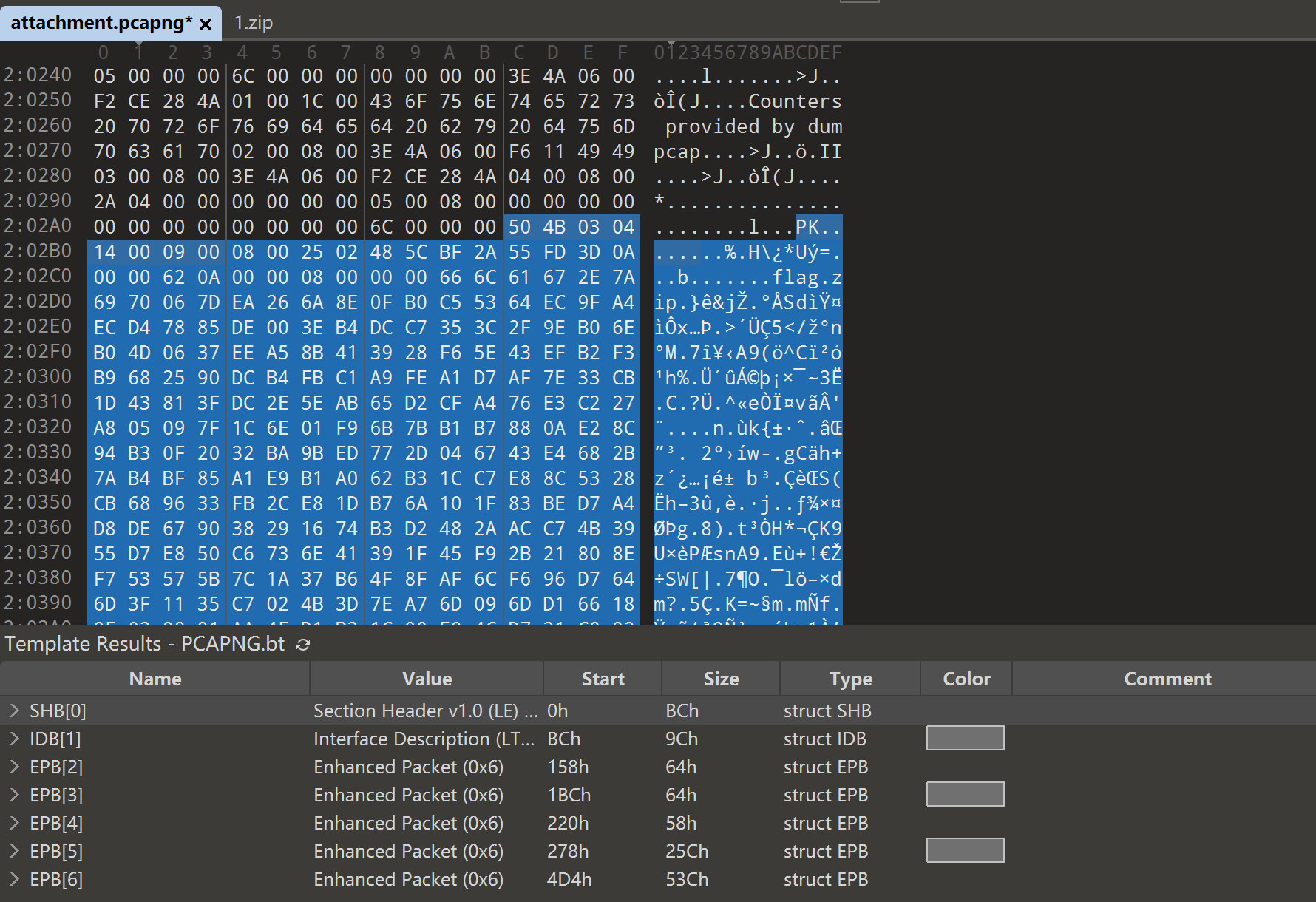
可以看到流量包后面还跟着一个压缩包,提取出来
image-20260208152146156
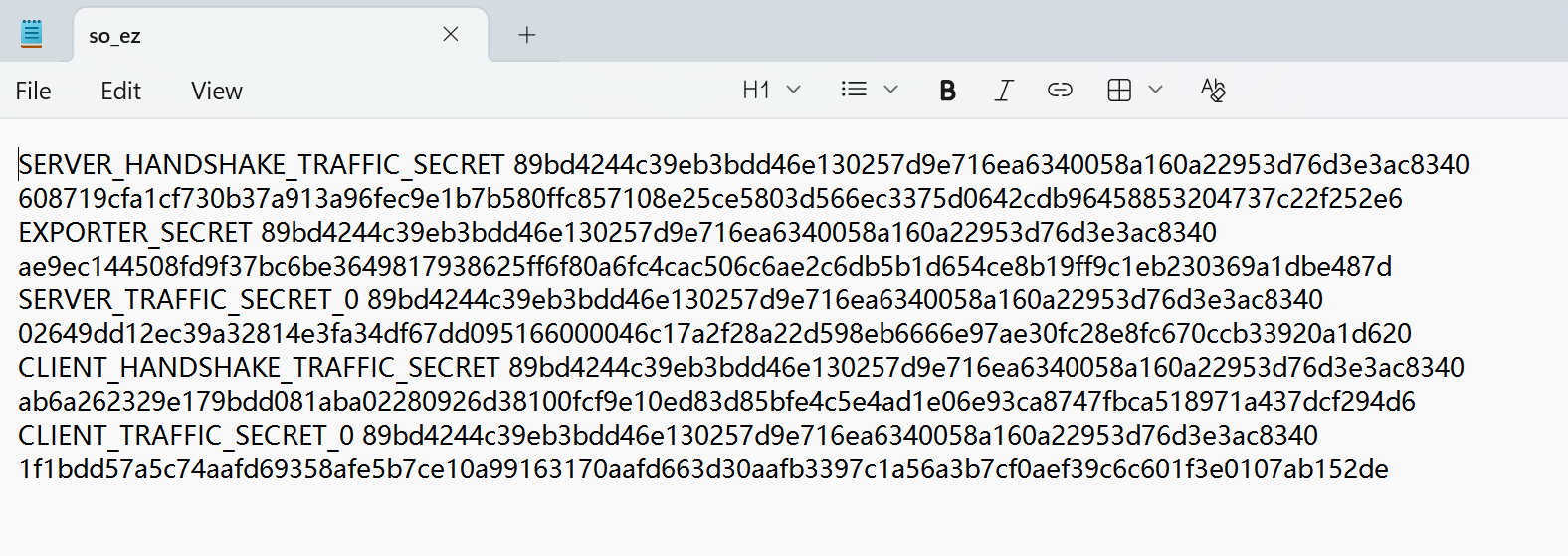
可以看出压缩包中的so_ez是一个sslkeylog
image-20260208152237659
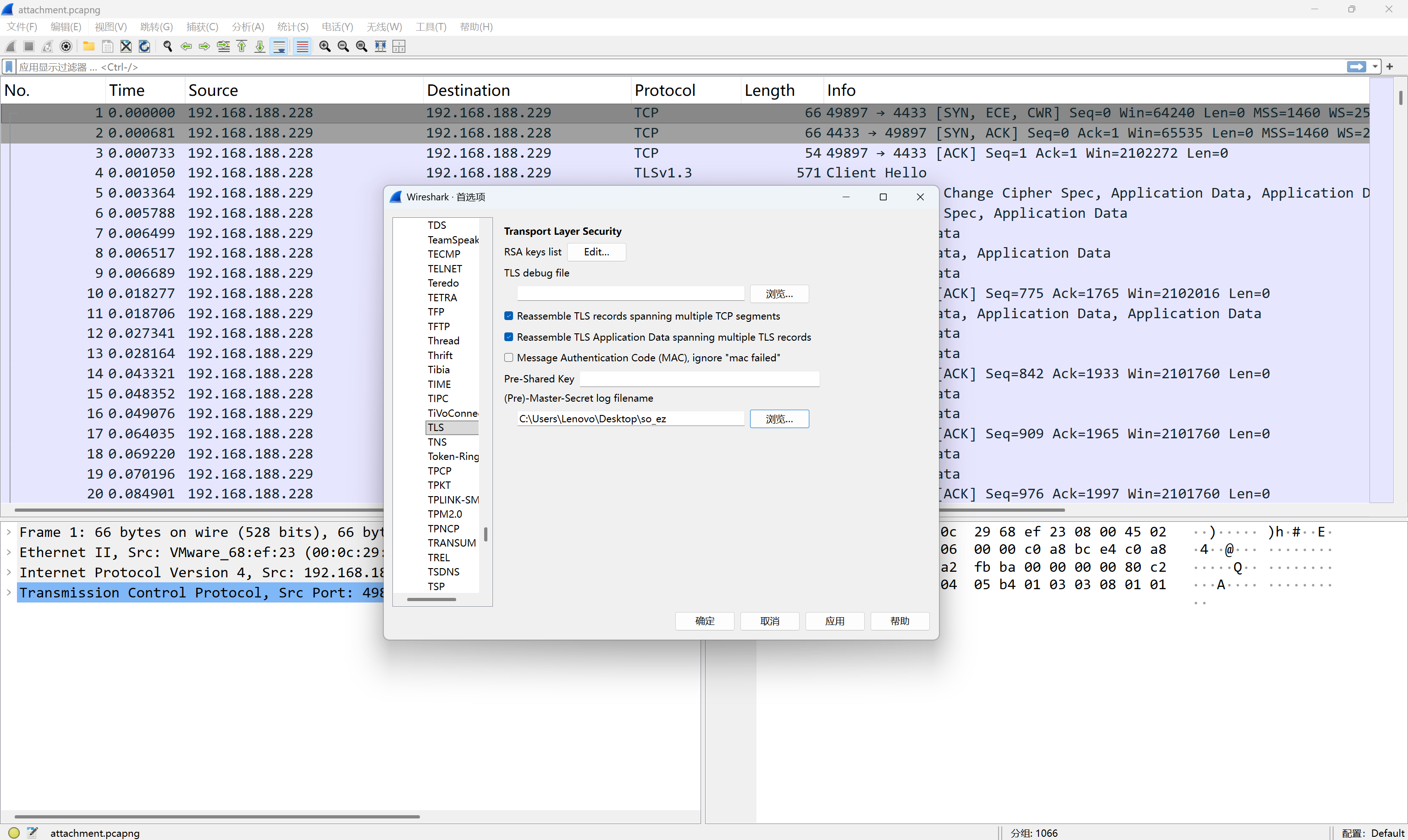
导入wireshark解密流量
image-20260208152337700
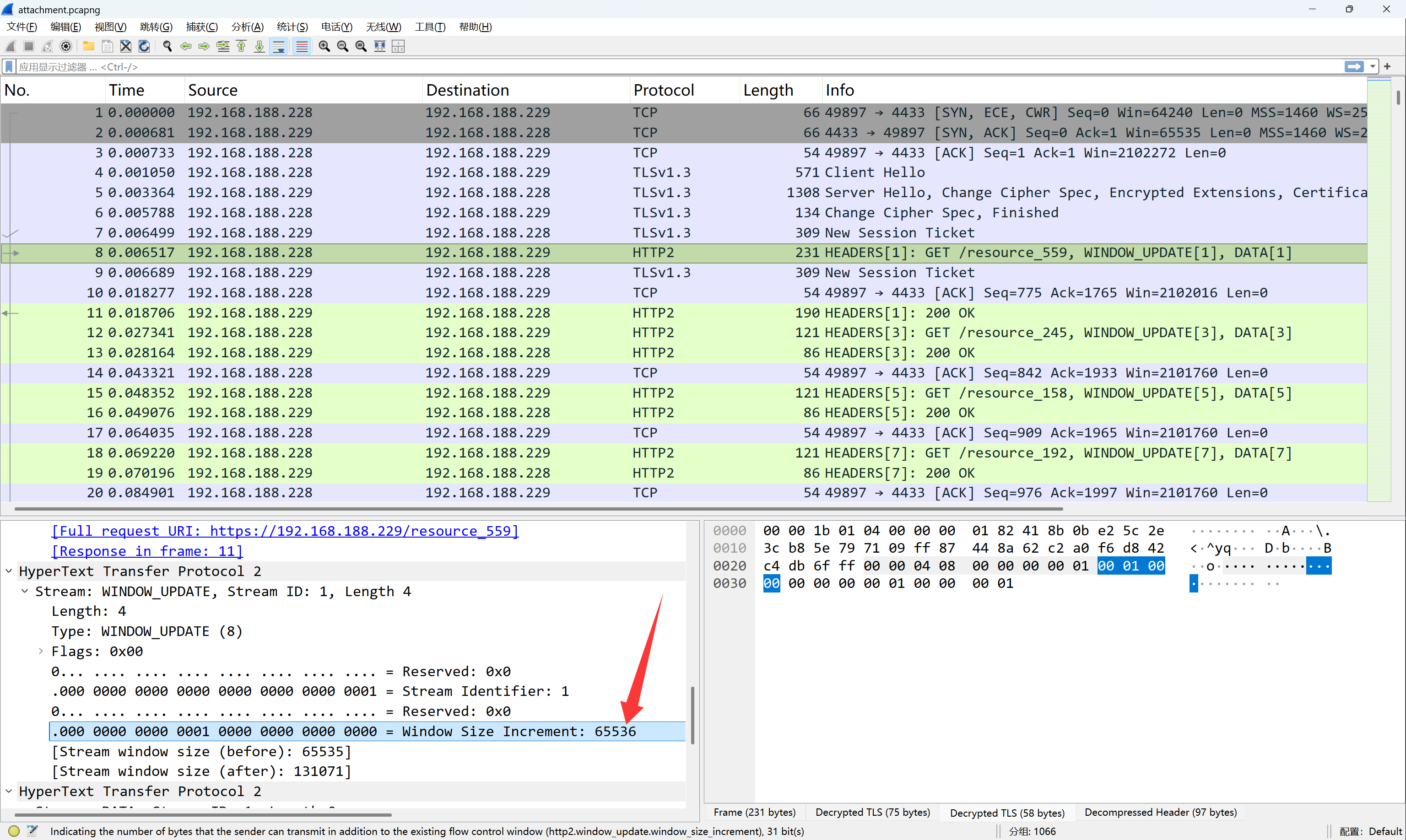
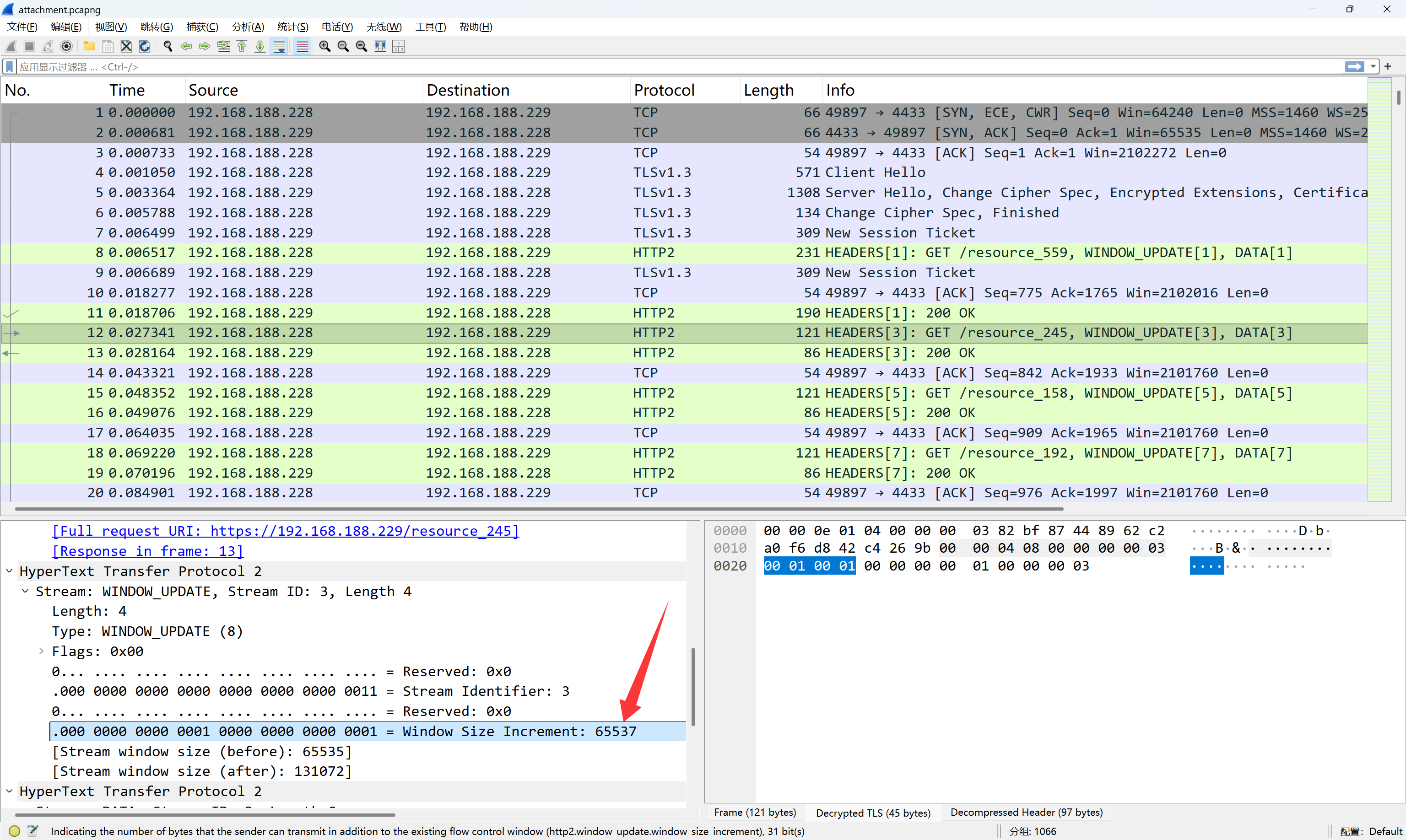
可以看到流量中有大量的HTTP2请求,仔细观察可以发现,其中WINDOW_UPDATE帧的Window
Size Increment字段的值总是65536或65537
image-20260208152741697
image-20260208152800713
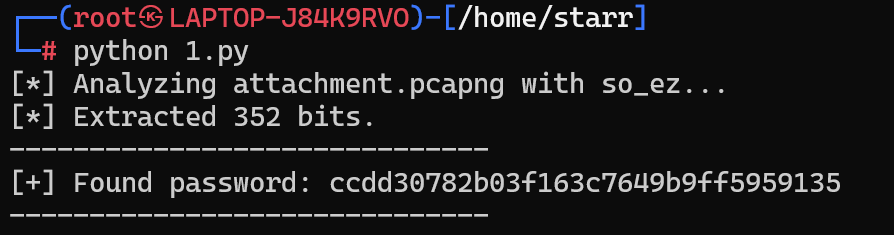
将65536记作0,65537记作1,可提取出一个字符串,即为压缩包密码
1 2 3 4 5 6 7 8 9 10 11 12 13 14 15 16 17 18 19 20 21 22 23 24 25 26 27 28 29 30 31 32 33 34 35 36 37 38 39 40 41 42 43 44 45 46 47 48 49 50 51 52 53 54 55 56 57 58 59 60 61 62 import subprocessimport base64import osdef solve_challenge (pcap_file, keylog_file ): print (f"[*] Analyzing {pcap_file} with {keylog_file} ..." ) tshark_cmd = [ "tshark" , "-r" , pcap_file, "-o" , f"tls.keylog_file:{keylog_file} " , "-Y" , "http2.window_update.window_size_increment" , "-T" , "fields" , "-e" , "http2.window_update.window_size_increment" ] try : result = subprocess.run(tshark_cmd, capture_output=True , check=True ) output = result.stdout.decode('utf-8' , errors='ignore' ).strip() if not output: print ("[-] No HTTP/2 Window Update frames found." ) err_msg = result.stderr.decode('utf-8' , errors='ignore' ) if err_msg: print (f"[!] Tshark Stderr: {err_msg} " ) return lines = output.split('\n' ) bits = "" for val in lines: val = val.strip() if val == "65536" : bits += "0" elif val == "65537" : bits += "1" print (f"[*] Extracted {len (bits)} bits." ) byte_data = bytearray () for i in range (0 , len (bits), 8 ): byte_str = bits[i:i+8 ] if len (byte_str) == 8 : byte_data.append(int (byte_str, 2 )) try : raw_decoded = base64.b64decode(byte_data) password = raw_decoded.decode('utf-8' ) print ("-" * 30 ) print (f"[+] Found password: {password} " ) print ("-" * 30 ) except Exception as e: print (f"[-] Decode failed. Bitstream might be incomplete." ) print (f"[*] Raw data as string: {byte_data.decode('utf-8' , errors='ignore' )} " ) except Exception as e: print (f"[!] Runtime Error: {e} " ) if __name__ == "__main__" : PCAP_PATH = "attachment.pcapng" KEYLOG_PATH = "so_ez" solve_challenge(PCAP_PATH, KEYLOG_PATH)
image-20260208152959744
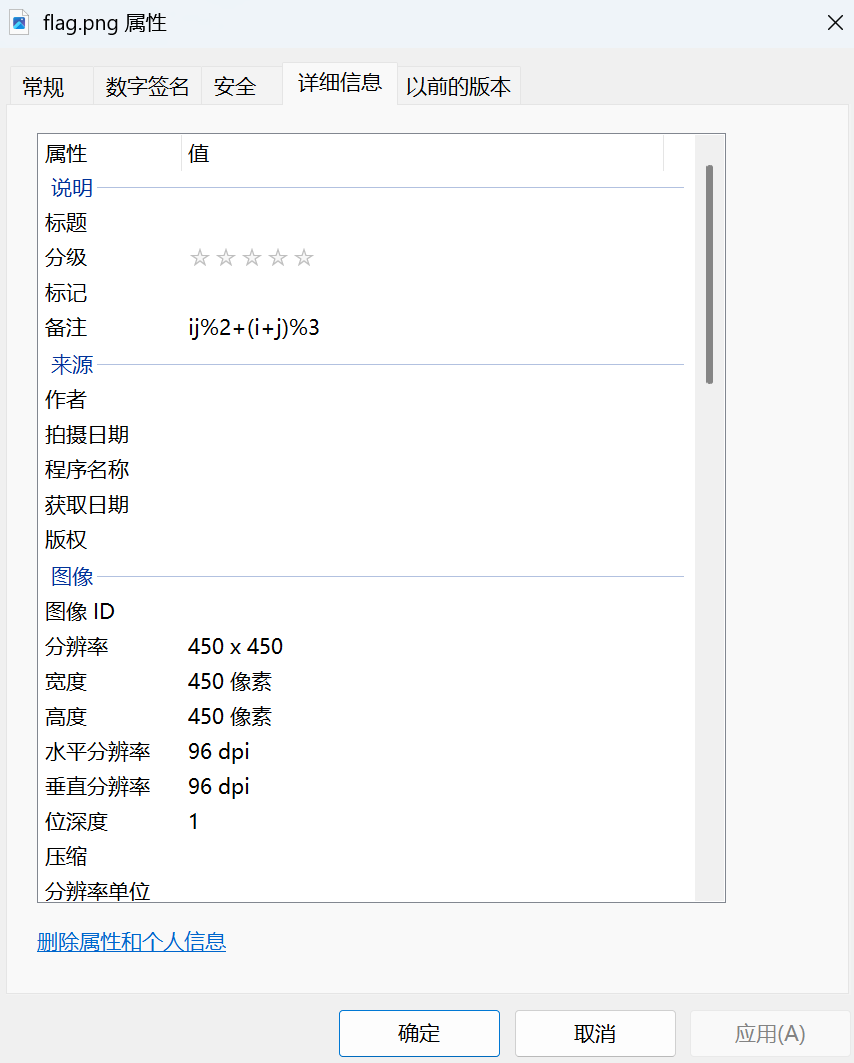
解得一个二维码,但是无法扫描,图片的备注中有一个式子
image-20260209231433779
可以看到这个二维码还是有较大块的连在一起的白色区域的,说明这里其实mask有问题。这里是一个自定义的mask,用的式子即为
\[
ij\%2+(i+j)\%3
\]
这里放出出题时生成二维码用的脚本,是通过劫持qrcode库的mask_func函数实现的
1
2
3
4
5
6
7
8
9
10
11
12
13
14
15
16
17
18
19
20
21
22
23
24
25
26
27
28
29
30
31
32
33
34
import qrcodeimport qrcode.utildef generate_custom_mask_qr (data, filename="flag.png" ): def my_custom_mask (i, j ): value = (i * j) % 2 + (i + j) % 3 return value == 0 original_mask_func = qrcode.util.mask_func def hijacked_mask_func (pattern ): return my_custom_mask qrcode.util.mask_func = hijacked_mask_func try : qr = qrcode.QRCode( version=5 , error_correction=qrcode.constants.ERROR_CORRECT_L, box_size=10 , border=4 , mask_pattern=0 ) qr.add_data(data) qr.make(fit=True ) img = qr.make_image(fill_color="black" , back_color="white" ) img.save(filename) print (f"应用公式: (i * j) % 2 + (i + j) % 3 == 0" ) finally : qrcode.util.mask_func = original_mask_func if __name__ == "__main__" : content = "flag{Y0U_F0UND_Th3_fl48!!_922a24f585ac8e4bacd7}" generate_custom_mask_qr(content)
现在要做的是对flag.png用自定义的mask异或回去,然后用正确的mask(0-7都可以,使用哪个mask对扫码并没有影响,只是是否最优的问题,所以这里用个mask0就行)再异或后即可正常扫描
1
2
3
4
5
6
7
8
9
10
11
12
13
14
15
16
17
18
19
20
21
22
23
24
25
26
27
28
29
30
31
32
33
34
35
36
37
38
39
40
41
42
43
44
45
46
47
48
49
50
51
52
53
54
55
56
57
58
59
60
61
62
63
64
65
66
67
68
69
70
71
72
73
import qrcodefrom PIL import Imagefrom pyzbar.pyzbar import decodedef decode_custom_mask_qr (image_path ): print (f"[*] 正在处理: {image_path} " ) img = Image.open (image_path).convert('L' ) width, height = img.size qr_version = 5 border = 4 qr = qrcode.QRCode(version=qr_version, border=0 ) qr.add_data("placeholder" ) qr.make(fit=False ) matrix_size = len (qr.modules) box_size = width // (matrix_size + border * 2 ) def is_functional (r, c, size, version ): if (r < 7 and c < 7 ) or (r < 7 and c >= size - 7 ) or (r >= size - 7 and c < 7 ): return True if r == 6 or c == 6 : return True align_pos = qrcode.util.pattern_position(version) for row_pos in align_pos: for col_pos in align_pos: if not ((row_pos < 7 and col_pos < 7 ) or (row_pos < 7 and col_pos >= size - 7 ) or (row_pos >= size - 7 and col_pos < 7 )): if abs (r - row_pos) <= 2 and abs (c - col_pos) <= 2 : return True if (r < 9 and c < 9 ) or (r < 9 and c >= size - 8 ) or (r >= size - 8 and c < 9 ): return True return False def custom_mask (i, j ): return ((i * j) % 2 + (i + j) % 3 ) == 0 def standard_mask_0 (i, j ): return (i + j) % 2 == 0 new_img = Image.new("1" , (width, height), "white" ) pixels = new_img.load() src_pixels = img.load() for x in range (width): for y in range (height): pixels[x, y] = src_pixels[x, y] print ("[*] 开始执行 XOR 逆向转换..." ) for r in range (matrix_size): for c in range (matrix_size): if not is_functional(r, c, matrix_size, qr_version): if custom_mask(r, c) != standard_mask_0(r, c): px_start = (c + border) * box_size py_start = (r + border) * box_size for px in range (px_start, px_start + box_size): for py in range (py_start, py_start + box_size): current_val = src_pixels[px, py] pixels[px, py] = 0 if current_val > 128 else 255 fixed_filename = "fixed_standard_mask_qr.png" new_img.save(fixed_filename) print (f"[*] 修复完成: {fixed_filename} " ) decoded_objects = decode(Image.open (fixed_filename)) if decoded_objects: for obj in decoded_objects: print (f"\nSUCCESS! 内容: {obj.data.decode('utf-8' )} " ) else : print ("\nFAILED. 依然无法解码。" ) if __name__ == "__main__" : decode_custom_mask_qr("flag.png" )
image-20260209235619230